

Speed plugin for WordPress Every page loads files.Asset Unloader
Keep only the ones it needs.
See the stylesheets and scripts each WordPress page loads, then turn off the ones it does not need. Every site gets 10 unload rules free, for good.
- Designed for
- WordPress 7.0 or later, PHP 7.4 or later
- Free to start
- 10 unload rules on every site
- Keep it for good
- One payment for 1, 5 or unlimited sites
10 rules free. One payment for more
Every site gets 10 unload rules free. For more, choose 1, 5 or unlimited sites, then connect each site on the plugin’s Account screen. One payment and no subscription.
Price range: $0.00 through $59.00
26% Off
 View larger
No images selected for this view.
Speed plugin for WordPress
Every page loads files.
Keep only the ones it needs.
- Designed for
- WordPress 7.0 or later, PHP 7.4 or later
- Free to start
- 10 unload rules on every site
- Keep it for good
- One payment for 1, 5 or unlimited sites
Load only what each page needs
Plugins and themes often load their stylesheets and scripts on every page, even where nothing uses them. Asset Unloader scans a page, lists every CSS and JavaScript file it loads, and lets you turn off the ones that page does not need. The browser has less to download, and you never write a line of code.

Example diagram.
- ScanScan one page, a whole post type, or a sample of 10 pages. Each file shows its owner and its size.
- UnloadTurn a file off for one page, every page of a post type, a URL pattern such as /shop/*, mobile or desktop visitors, or the entire site.
- KeepUnload a file everywhere except the pages that need it. A keep rule always wins.
- CheckAdd ?asset_unloader_debug=1 to a page address to see which rules matched and what was removed.
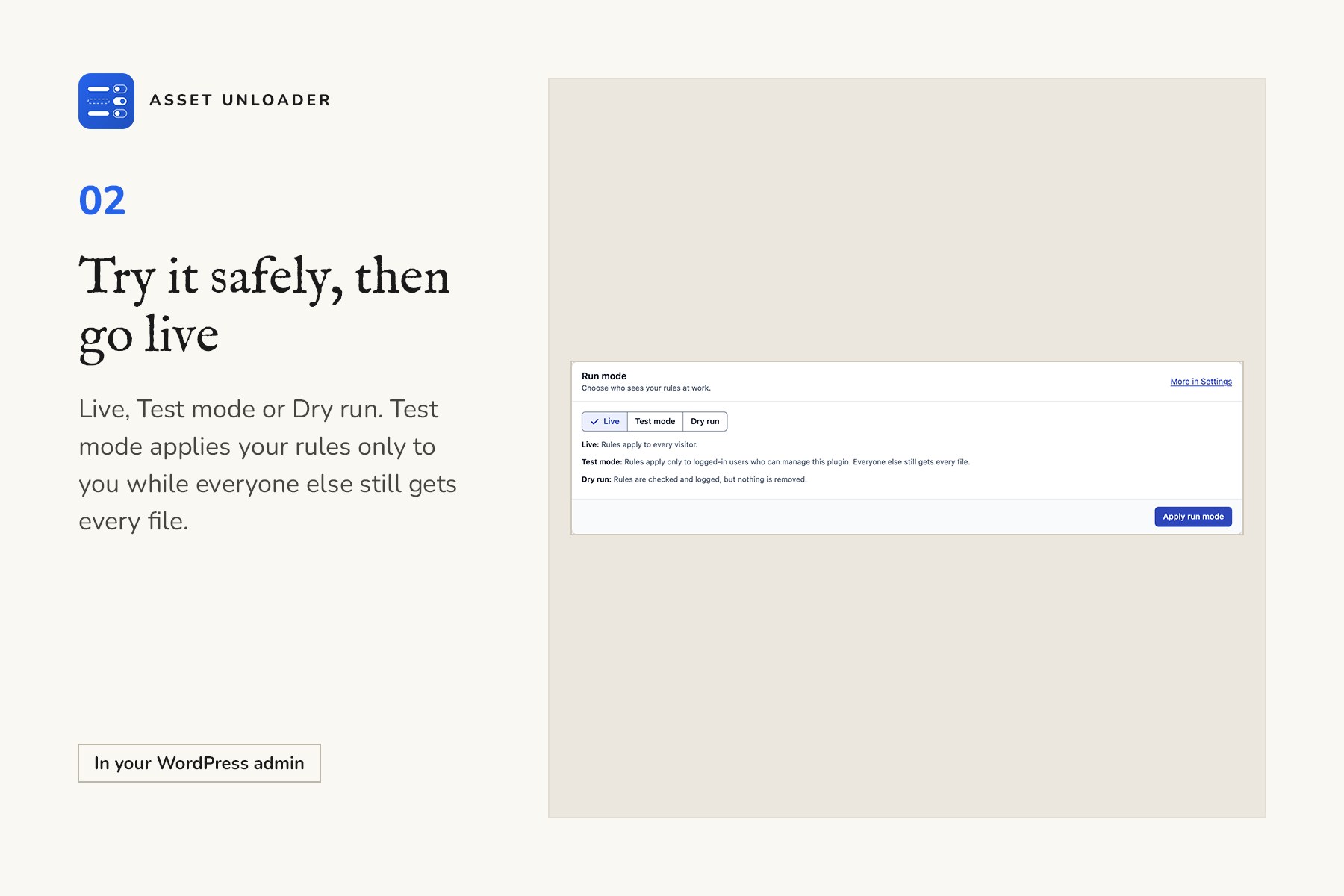
Try it safely, then go live
Test before visitors see it
Test mode applies your rules only to signed-in people who manage the plugin. Dry run removes nothing and records what it would have removed. Live applies the rules to every visitor.
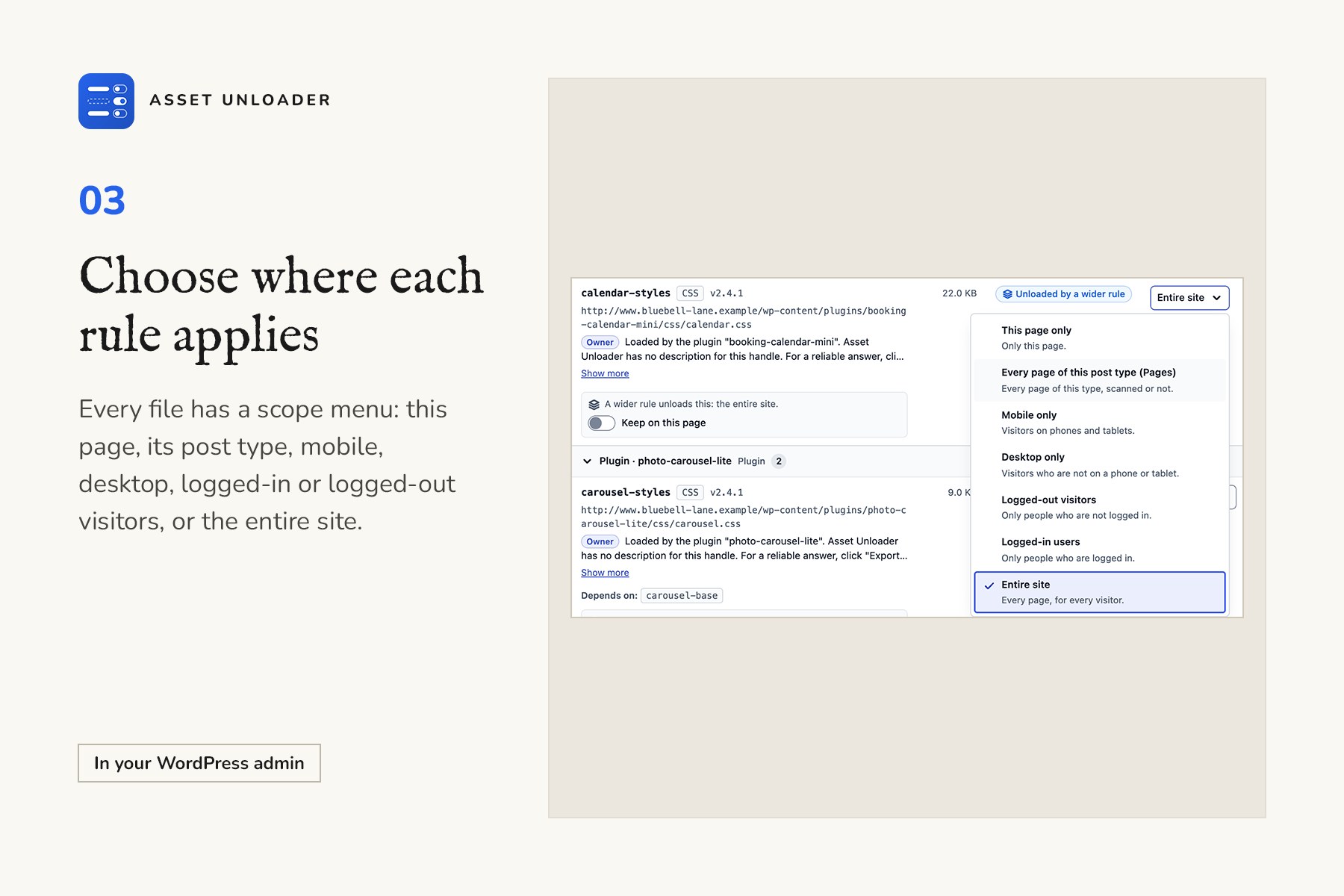
Choose where each rule applies
Every file has a scope menu: this page, its post type, mobile, desktop, logged-in or logged-out visitors, or the entire site.
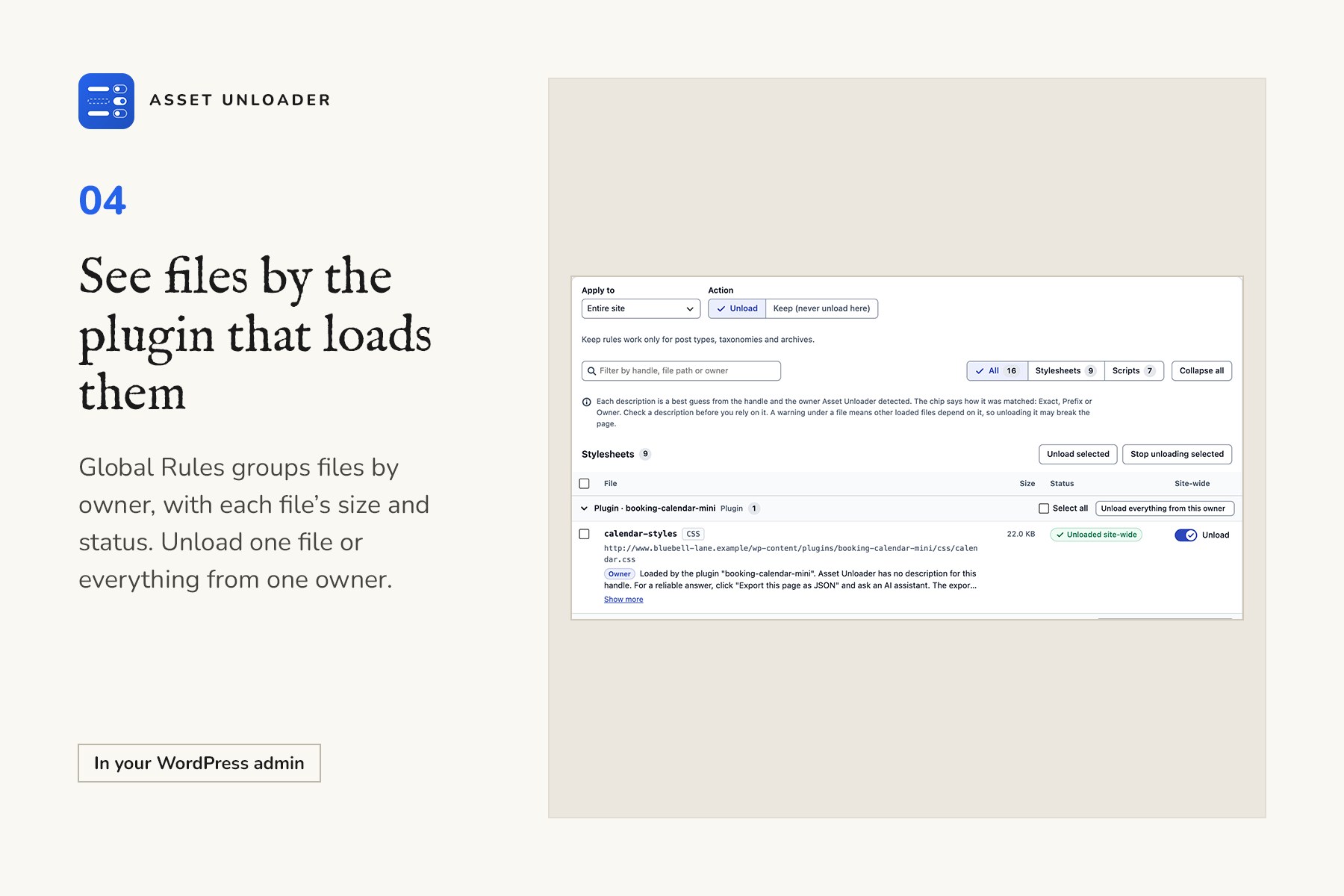
See files by the plugin that loads them
Global Rules groups files by owner, with each file’s size and status. Unload one file or everything from one owner.
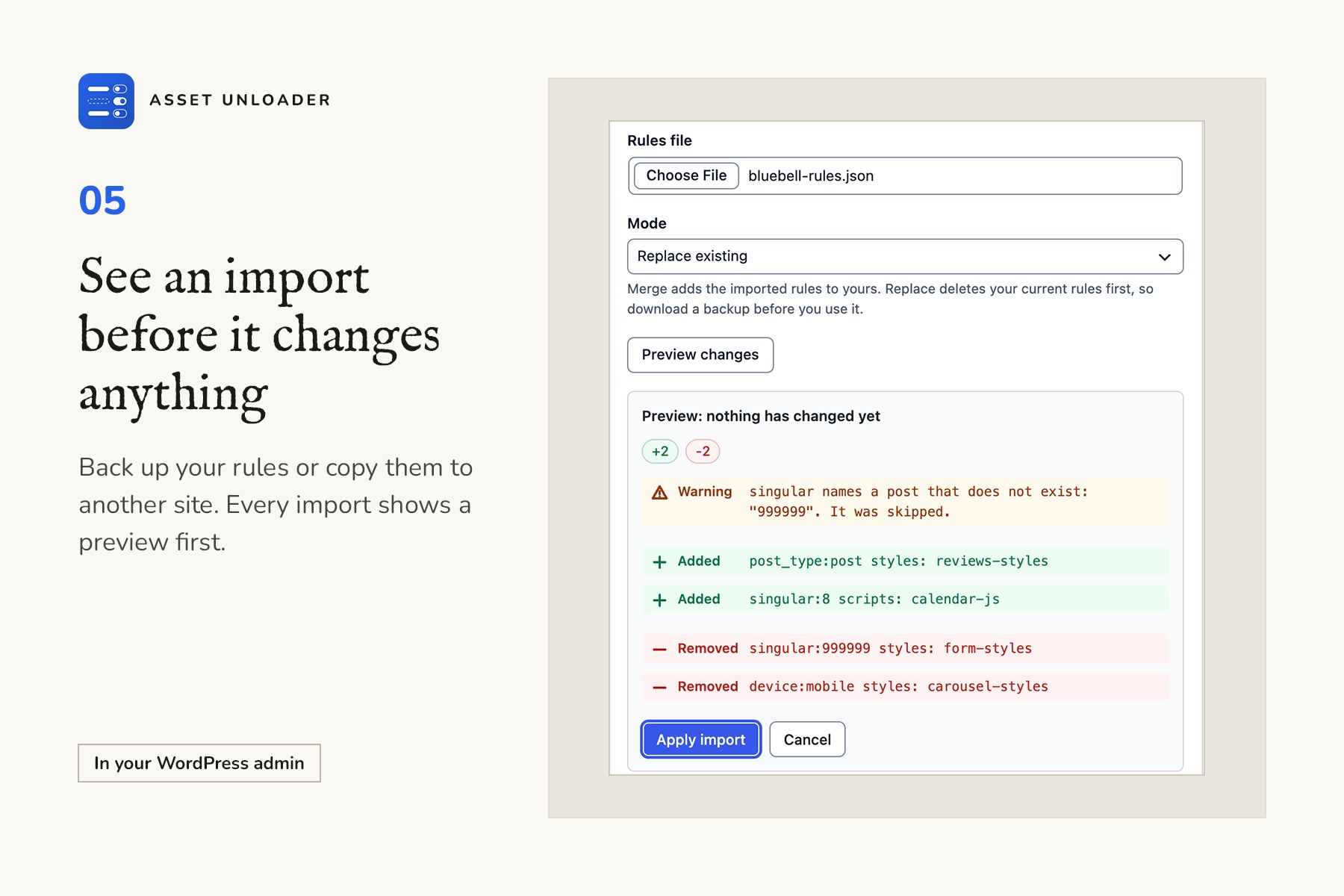
See an import before it changes anything
Back up your rules or copy them to another site. Every import shows a preview first.
Undo any of the last ten changes
Change history records who changed which rule and when. Restore puts your rules back to how they were before any one of the last ten changes.
See what depends on what
A file shows a warning when files that stay loaded depend on it. Turn on Strict dependencies to refuse an unload that would break a file that stays loaded.
Catch collisions early
When an unload rule and a keep rule would cover the same file on the same pages, Asset Unloader asks which one should win before it saves anything. Diagnostics lists existing collisions and rules for pages that no longer exist.
Also in the plugin
- An Asset Unloader panel in the block editor, and a meta box in the classic editor.
- WP-CLI commands and REST routes for scripts.
- A scan you can pause and resume where it stopped.
Free to start. Keep it for good
Free to start
Every site gets 10 unload rules free, with no time limit. Scans, keep rules, Diagnostics, import and export are always free. Choose Free start above to get the download with your order.
No timer and no monthly reset.
One-time purchase
One payment covers more unload rules on 1, 5 or unlimited sites, with every future update and no subscription. Staging and local sites are free. Add it now or later, then connect the site on the plugin’s Account screen.
Your saved rules keep working whatever happens to the purchase or the connection.
Buy it once. It’s yours
Asset Unloader is one payment, with every future update included. Nothing renews, and your saved rules keep working whatever happens to your purchase. Start free with 10 unload rules, and pay only if you need more.
One payment. Every future update. Nothing renews.
How Asset Unloader compares
| What you get | Asset Unloader | Perfmatters | Asset CleanUp |
|---|---|---|---|
| Unload CSS and JavaScript on one page | Yes | Yes | Yes |
| Unload by post type | Yes | Yes | Yes |
| Unload by URL pattern or regular expression | Yes | Yes | Not listed |
| Rules for mobile or desktop visitors | Yes | Yes | Yes Paid version |
| Rules for logged-in or logged-out visitors | Yes | Yes | Not listed |
| Test mode before visitors see your rules | Yes | Yes | Yes |
| Free version | Yes 10 unload rules, for good | No Paid plans only | Yes On WordPress.org |
| How you pay | One payment | Yearly, renews automatically | 1-year or 2-year license, renews automatically |
| Updates | Every future update, included | While your license is renewed | While your license is renewed |
| 1 site | $19 once | $24.95 a year | $49 a year |
| Unlimited sites | $79 once | $124.95 a year | $149 a year |
| 1 site over 3 years | $19 | $67.37 | $127.40 |
| Unlimited sites over 3 years | $79 | $337.37 | $387.40 |
Perfmatters details are from perfmatters.io. Asset CleanUp details are from gabelivan.com and its WordPress.org page. A dash means its pages don’t mention it. All checked November 27, 2026, at regular prices before any sale. Three-year totals use each yearly plan and its renewal discount, 15% for Perfmatters and 20% for Asset CleanUp.
Fits your workflow
Made for WordPress
Use WordPress 7.0 or later with PHP 7.4 or later. Asset Unloader works with any theme and page builder that loads its files the WordPress way.
Works with your cache
Files come off before the page is built, so new cached pages already leave them out. Clear your cache after you change rules.
Works behind Cloudflare
If a Cloudflare challenge blocks a scan, the scanner connects to your own server and sends your site’s name.
Nothing about your visitors leaves
No telemetry, no analytics and no API key. The plugin talks only to twigandolive.com, for update checks and the connection of a site you choose to connect.
Updates inside WordPress
Connect the site and updates appear in Dashboard, Updates like any plugin. Each update is checked against Twig & Olive’s signature before it installs.
No AI inside
Asset Unloader never calls an AI model and holds no API key. Its JSON exports work with any tool you choose.
Questions about
Asset Unloader?
What does Asset Unloader do?
It shows every stylesheet and script each page of your WordPress site loads, and lets you turn off the ones a page does not need, per page, post type, URL pattern, device or site-wide.
What can I do for free?
Every site gets 10 unload rules free, for good. Scans, keep rules, Diagnostics, import and export are always free. There is no timer.
What happens to my rules if I stop using the purchase?
Your saved rules keep working whatever happens to the purchase or the connection. Adding a new unload rule past 10 needs the purchase.
Do staging and local sites count?
No. Staging and local sites are free and do not use a site on your purchase.
How do updates work?
Connect the site on the plugin’s Account screen. Connecting is free, with or without the purchase. Updates then appear in Dashboard, Updates, and automatic updates work too.
Will it break my site?
It can, if you unload a file a page needs. Use Test mode or Dry run first, check each page, and restore any of the last ten changes from Change history.
Does it send data anywhere?
Only to twigandolive.com, for update checks and, once you connect a site, a daily check of its connection. Nothing about your visitors, pages, files or rules is sent.
Refund Policy
If Asset Unloader isn’t right for you, email [email protected] within 14 days of purchase with your order number, and we’ll refund you. The purchase ends when the refund is issued, and your saved rules keep working. This does not limit your statutory rights. Read our full Return & Refund Policy.
Terms & Conditions
One payment covers more unload rules on 1, 5 or unlimited sites, with every future update and no subscription or renewal.
Read the Terms of Service.
Refunds
If Asset Unloader isn’t right for you, email [email protected] within 14 days of purchase with your order number, and we’ll refund you. The purchase ends when the refund is issued, and your saved rules keep working. This does not limit your statutory rights. Read our full Return & Refund Policy.
Reviews (0)
Only logged in customers who have purchased this product may leave a review.


Reviews
There are no reviews yet.