
Pick two folders
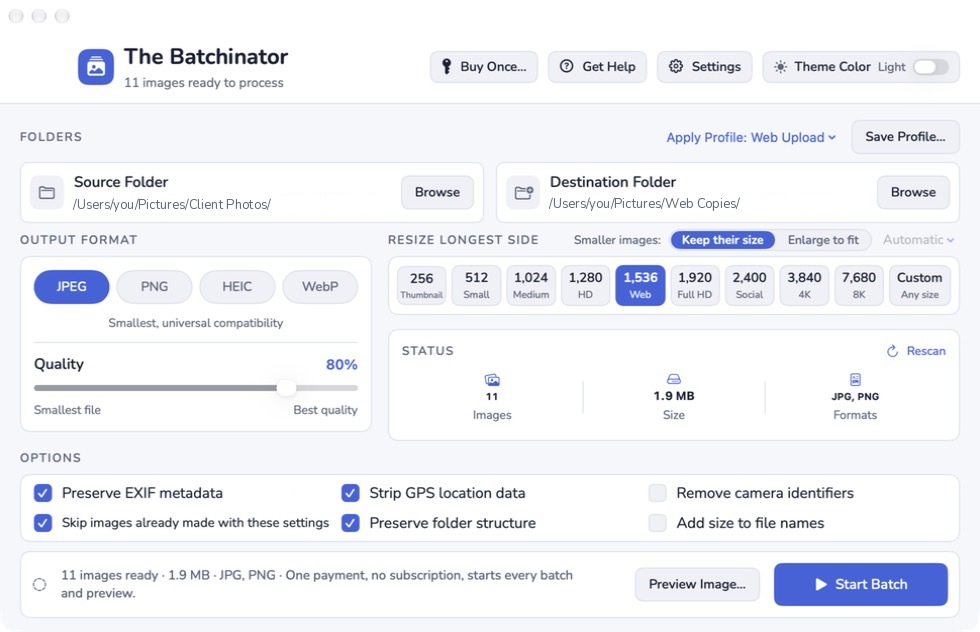
Choose your source and a separate destination. The app reads the source and tells you how many pictures it found.
A whole shoot, ready to share
Resize a whole shoot at once. Make smaller copies for galleries and email, or enlarge smaller pictures where supported, while your originals stay as they are.
One-time purchase · Mac app
One payment covers the whole app and every future update. No subscription, auto-renewal, tiers, or add-ons.
Lifetime license. Two of your own Macs. Every future update to this app.
Version 1.9.0 · build 21. macOS 14 or later. Apple Silicon and Intel.
There is no free tier or trial. After purchase, get your installer in My Apps and connect your Mac before running a preview or batch.
Connect online first, then work offline for up to 30 days at a time. If your offline access expires during a batch, the license check won’t stop it. Reconnect before starting another batch or preview.
Earlier interface (before 1.8.0). The current main window has a different layout and controls.
From a folder to finished copies
Point The Batchinator at your pictures, choose a separate folder for the copies, and pick the size and file type you need. Your originals never change.
Choose your source and a separate destination. The app reads the source and tells you how many pictures it found.
Use Web Upload, Email, or Archive 4K, or choose the settings yourself. Preview a picture to compare its original and output size before you run the batch.
Make the copies in one run. The results explain which pictures succeeded, were skipped, or need attention.
Smaller or bigger
Set the longest side for a quick resize, or open Advanced Output… for Fit in a box, Exact width, Exact height, Percent of original, or Crop to a shape. Cropping happens only when you choose Crop to a shape; the other sizing modes keep the full picture. Borders are optional.
Small pictures can keep their size, or you can choose Enlarge.
Automatic chooses Photos for most photographs and Hard edges for pixel art and simple flat graphics. Photos uses a little sharpening; Hard edges keeps square pixels crisp.
Photos stops at 4 times bigger. If a picture needs more, the app skips it and tells you the largest supported size. Hard edges can go past 4 times. The file and batch size limits under Requirements still apply.
Enlargement cannot add detail that was never in the picture. Twice the size can work well; four times can look soft up close. The app does not invent faces, textures, or words.
Everything in one purchase
Archive 4K makes resized JPEG copies. Keep your originals; a resized copy is not an original-file backup.
Before you begin
Reads most photo types, including JPEG, PNG, HEIC, and camera RAW files supported by your Mac. Available output formats depend on macOS support.
One batch can handle up to 10,000 pictures, up to 512 MB each and 4 TB in all. Larger jobs can be split into separate folders and batches.
Download the paid installer from My Apps. Click Activate… in the app title bar, then choose Connect My Purchase in the sheet and sign in through your browser with the account you used at checkout. There is no license key to paste. Manage your two connected personal Macs in My Apps.
Pictures are processed on your Mac. Activation and update checks use the internet; after a successful online check, you can work offline for up to 30 days at a time.
Open My AppsRefunds
If The Batchinator isn’t right for you, email [email protected] within 14 days of purchase with your order number, and we’ll refund you. Your license ends when the refund is issued. This does not limit your statutory rights.
Email [email protected]Questions
No. The Batchinator is a one-time purchase with no free tier or trial. Your installer is in My Apps after purchase. To activate this Mac, click Activate… in the app title bar, then choose Connect My Purchase in the sheet. Activation is required before you can use the live preview or start a batch.
No. The app reads your source pictures and writes resized copies to a separate destination folder. The two folders must be separate: not the same folder, not one inside the other, and not connected through a Finder alias.
Yes. Choose Enlarge. Automatic picks Photos for most photographs and Hard edges for pixel art or flat graphics. Photos stops at 4 times bigger; Hard edges can go past 4 times. If a picture is too small for the chosen method, the app explains that in the results. Enlargement cannot recreate detail that was never there.
Processing happens on your Mac. Connecting your purchase needs the internet. After a successful online check, your Mac can work offline for up to 30 days at a time. If your offline access expires during a batch, the license check won’t stop it. Reconnect before starting another batch or preview.
Everything the app does today, including resizing, enlargement, supported output formats, previews, profiles, and metadata choices. Your lifetime license covers two of your own Macs and every future update to The Batchinator.
The app downloads cloud placeholders as each picture is processed, so stay online while the batch runs. If macOS cannot download a picture, the app reports Not downloaded. Check your connection and retry. To download cloud pictures ahead of time, use Show in Finder on the From card.
The guide takes you through installation, folders, profiles, formats, sizes, metadata, previews, batch results, and account setup.
Read The Batchinator help