

Choose the card
The app opens removable memory cards read-only, then scans for supported still-photo formats.
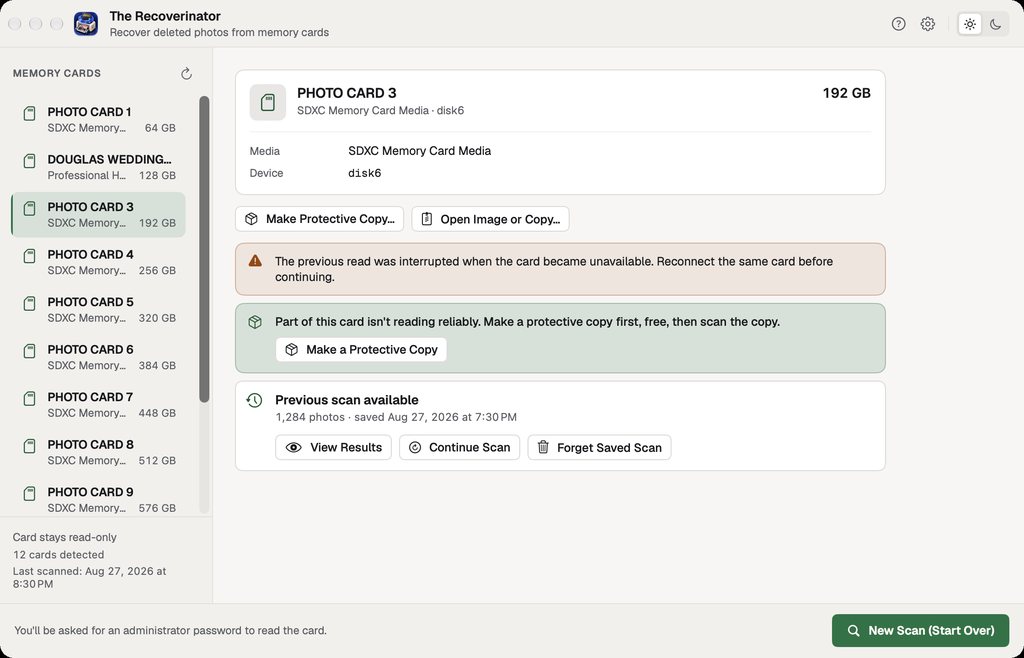
Photo recovery for Mac
Recover deleted still photos from memory cards on your Mac. Scan free and recover up to 100 photos at full size on this Mac before you decide whether to buy.
Start free
Scan and review without an account or payment. Recover up to 100 photos at full size on this Mac, across all cards. Your free count stays with this Mac across relaunches. There is no time limit.
Download and recover freeVersion 1.8.0 · build 20. macOS 13 or later. Apple Silicon and Intel.
Protect the card: stop using it, and don't format, repair, or copy anything to it until your photos are recovered.
One-time license
A one-time lifetime license gives you recovery without the free count limit, plus Quick Look, Open, and Export Raw Image on two of your own Macs. Every future update is included. No subscription, auto-renewal, tiers, or add-ons.
Two personal Macs. Lifetime license. All future updates to this app.
Browse the results with filters, photo tiles, and a focused photo inspector. Demonstration images. No customer photos.
Before you scan
Stop taking pictures with the card. Do not format it, repair it, or copy anything onto it. Anything new saved to the card can cover photos that are still recoverable.
A careful path through the card
The app opens removable memory cards read-only, then scans for supported still-photo formats.
Small thumbnails and file checks show what the scan found and which files look complete. Search and filters help you find the ones you want.
Choose a folder on your Mac or another drive for your free or licensed recovery. The app won't save to the card it's reading, or to any folder it can't confirm is on a different drive.
One app, two clear choices
Only successfully saved photos count toward the 100 free recoveries. You never have to scan before you buy. A license lifts the free limit, but it can't guarantee that every deleted or damaged photo will come back.
Before you begin
JPEG, PNG, HEIC and HEIF, TIFF, CR2, CR3, NEF, ARW, RAF, ORF, DNG, RW2, RWL, PEF, SRW, DCR, and ERF.
The app finds the RAW formats listed in its Guide. Whether a RAW photo shows a preview depends on the camera model and your version of macOS; recovery does not depend on the preview. Panasonic RW2 and Leica RWL files never say where their image data ends, so the app estimates it, never gives them a green check, and they may come back incomplete.
After purchase, sign in through your browser to connect the Mac to your Twig & Olive account. There is no license key to paste. After a successful online check, the app works offline for up to 30 days. Manage connected Macs in My Apps.
Open My AppsRecovery limits
The Recoverinator only reads the card and never writes to it. Your photos are processed on your Mac, and the app doesn't upload them. Connecting your purchase and checking for updates use the internet.
Refunds
Email us within 14 days of purchase. We'll work through a reasonable troubleshooting attempt with you, using only steps that are safe for your card. If you still can't recover the photos you bought it for, we'll refund your purchase. We won't ask you to send us your photos. This works the same whether you scanned first or bought right away.
If the app recovers your photos and you no longer need it, that doesn't automatically qualify for a refund. Any rights you have under consumer protection law still apply.
Email [email protected]Questions
No. Download the app and scan without an account or payment. You may also buy a license first if you prefer. The same license terms apply either way.
Each unactivated Mac can recover up to 100 photos at full size across all cards. Only photos the app successfully saves count. The total stays with this Mac across relaunches and has no time limit. Quick Look, Open, Export Raw Image, and further recoveries require a license.
No. Looks intact means the file structure appears complete, which is a good sign. It does not check every pixel, so it cannot prove the full original survived.
Your Mac's own storage or another drive works. The app won't save to the card it's reading, or to any folder it can't confirm is on a different drive.
No. Scanning and recovery happen on your Mac, and the app doesn't upload your photos. Connecting your purchase and checking for updates still need the internet.
The Recoverinator runs on Macs with macOS 13 or later and recovers still photos only. It doesn't run on Windows, recover video, or repair cards.
The online guide covers installation, card safety, scanning, file checks, recovery, account setup, and troubleshooting.
Read The Recoverinator help