Logo of Twig & Olive Photography featuring an olive branch and elegant typography

The Contentinator

$0.00

Find the little things that make a page harder to read, search, or share. The Contentinator checks pages and drafts on your Mac, explains what it found, and walks you through what to fix first.

  • macOS 14 or later
  • Apple silicon and Intel
  • 10 checkups without an account

Free download and updates. No account needed to start. Screens show a sample website, and plan-based improvements are coming soon. Safari Assist requires Safari 18.4 or later.
Category:

Description

Start with what is already there

See what your page needs.

Check search basics, headings, links, images, structured data, social cards, and access for AI search. New checks cover readability, tap-to-call phone links, business details, contact and About pages, and bylines. Each finding explains what the app found, why it matters, and how to fix it, with links to sources from Google and other trusted guides.

A score you can understand.

See how many checks make up your score. How This Score Works lists each scored check and its weight. Fix these first puts the five most important fixes at the top, with a reason for each one.

Steps for your website.

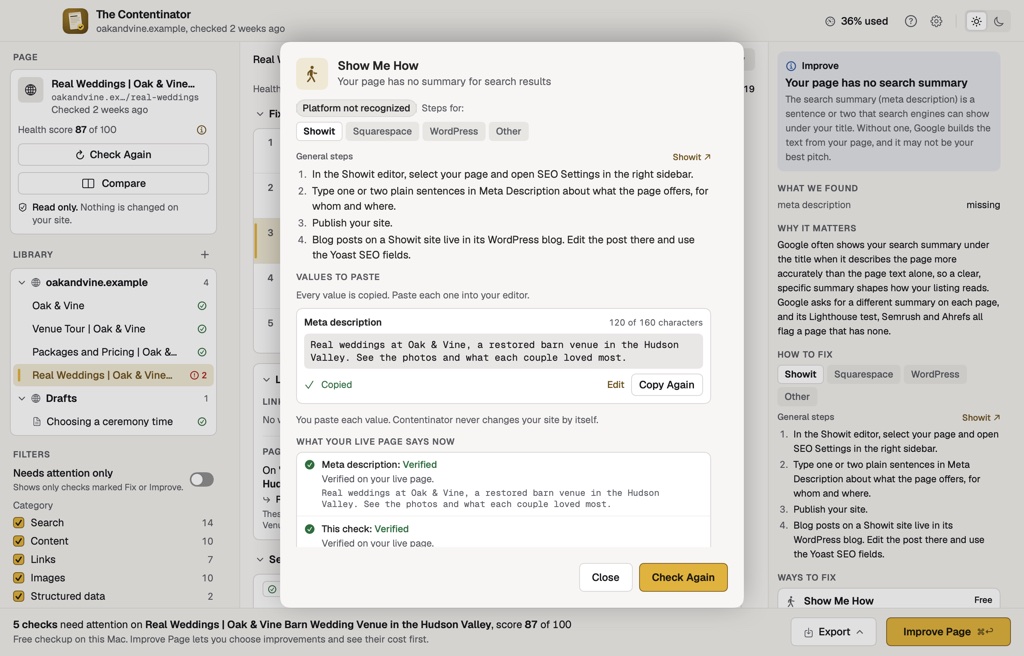
Ways to fix gives you a next step. Show Me How walks through the change for Showit, Squarespace, or WordPress, with values ready to copy. After you publish, I’ve Published It checks your live page again.

Start with 10 free checkups.

Check 10 pages on this Mac without an account. Keep your findings in the Library, compare earlier checkups in History, and export your work. Account-based checkups and plan improvements are coming soon.

Improve with Contentinator

A little help with the words.

Get a title or description suggestion on your Mac for free. Set a Brand Voice and House Rules so the app knows how you write.

Improvements made with a Twig & Olive plan are coming soon. These will help rewrite a page, describe photos, suggest search titles and descriptions, or draft a FAQ from facts already on the page.

The free download, checkups, Library, History, and exports do not need a paid plan. Updates are free and need no account.

Guided steps for fixing a page, with suggested values ready to copy.
Example screen using a sample website. Show Me How gives you steps and values to copy into your editor. Plan-based improvements are coming soon.

Review it before you use it

Your voice. Your final say.

Copy HTML or formatted text for your website editor, or preview your own WordPress page. When plan improvements arrive, Compare will show the original and improved page, and Changes will list the changed words. You will also be able to review those changes before publishing them to WordPress, with undo for 30 days.

Bring the page you are working on.

Enter a public page address, paste a draft, or import a document. Contentinator Assist for Safari brings the page you are viewing into the app, including a draft or preview, and keeps fixes ready to copy beside your editor. Safari Assist requires Safari 18.4 or later. Browser and staging pages stay Private.

See the site, not just one page.

Use Site Overview for a whole-site view, find links between your pages with Link Ideas, or compare a competitor’s page with yours. History charts earlier checkups and marks where the scoring changed. Export a PDF client report or check pages from Shortcuts.

Keep the next step close.

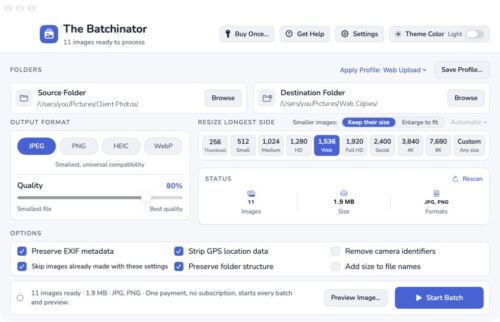
Fix with Batchinator copies flagged photos from your site and opens them in The Batchinator. When plan improvements are available, Improve Selected Pages can work through several pages within a limit you set.

Know where your work goes.

Your Library, History, and exports stay on this Mac. When plan improvements become available, running one sends the text and your writing settings to the Twig & Olive service. Photo descriptions also send small copies of the selected photos. Review every result before you use it.

A few things to know.

Do I need an account?

You can download the app, check 10 pages on this Mac, and use the Library, History, exports, and updates without an account. Account-based checkups and improvements made with a Twig & Olive plan are coming soon.

Does it change my website?

You choose what to change. Copy a guided fix into your website editor. You can also preview and connect your own WordPress site. Publishing generated changes to WordPress, with undo for 30 days, will be available when plan improvements arrive. A checkup by itself publishes nothing.

Does it work offline?

Your saved Library, History, settings, and in-app Help stay available offline. Reading public pages, checking their links, verifying published changes, and checking for updates need an internet connection.

What Mac do I need?

The Contentinator runs on Apple silicon and Intel Macs with macOS 14 or later. Safari Assist requires Safari 18.4 or later.

What if I have version 1?

Install version 2 by hand from this page. Your saved settings move across when you open it. The app helps you review your Brand Voice and House Rules, and asks about removing any old saved API keys.

The Contentinator 2.1.0 · Updated October 28, 2026

Terms & Conditions

  1. Agreement and Acceptance
    These Terms & Conditions constitute the entire agreement between Twig & Olive Photography LLC (“we,” “us,” or “our”) and the Purchaser (“you” or “your”), as identified on the Bill of Sale, and supersede any prior oral or written agreements. By purchasing any Photoshop Actions, Lightroom Presets, ACR Settings, Photography Education Courses, Guides, Templates, Marketing Materials, or Business Documents (the “Products”), you agree to these Terms & Conditions. If any provision of these Terms & Conditions is deemed invalid or unenforceable by a court of law, the remaining provisions will remain valid and enforceable.
  2. Copyright and Ownership
    All Products are copyrighted and owned by Twig & Olive Photography LLC. We retain all copyrights, moral rights, and intellectual property rights, including those not explicitly granted in this agreement. All instructional content and related materials are protected indefinitely. No ownership rights are transferred to you.
  3. Permitted Uses
    1. You may use the Products in the production of personal and/or commercial works.
    2. Each purchase includes a single-use license for one individual or one business entity only.
  4. Prohibited Uses
    1. You may not resell, redistribute, share, mimic, reproduce (in whole or in part), or disseminate the Products in any way to any third party.
    2. Sharing Products with individuals outside your business or transferring licenses is strictly prohibited.
  5. Refund Policy
    Due to the downloadable nature of the Products, no refunds will be issued for any reason. Ensure you review all product details and contact us with any questions prior to purchase.
  6. Breach of Terms
    If you violate these Terms & Conditions, it will result in irreparable harm to Twig & Olive Photography LLC, for which monetary damages may be insufficient. In such cases, we are entitled to seek injunctive relief (court orders) to enforce compliance with these Terms. If we prevail in legal action, we may recover reasonable costs, compensatory and punitive damages, and attorneys’ fees from you.
  7. Dispute Resolution
    Any disputes arising from these Terms & Conditions will be resolved through binding arbitration in accordance with Chapter 788 of the Wisconsin Statutes.

    1. A panel of three arbiters will be selected: one by each party, and a third by agreement of the party-appointed arbiters.
    2. Arbitration will take place in Dane County, Wisconsin.
    3. The arbiters’ decision will be final and binding on all parties.
  8. Governing Law
    These Terms & Conditions are governed by the laws of the State of Wisconsin, without regard to its conflict of law principles.
  9. Acknowledgment of Terms
    By completing your purchase, you acknowledge that you have read, understood, and agreed to these Terms & Conditions in their entirety.


Refund Policy

This product is a digital download and is therefore non-refundable. Once purchased, you will immediately gain access to the product, making refunds or exchanges unavailable under any circumstances.

To ensure you select the correct product, we strongly encourage you to review the product details carefully before purchasing. If you have any questions or concerns about the product, please contact us before buying, and we’ll be happy to assist you in making the right choice.

By completing your purchase, you acknowledge and agree to these terms.

Go to Top